
CrowdSec for EmDash brings your CrowdSec Local API into the EmDash admin. It shows the alerts, bans and top threats CrowdSec records for your server, and, if you allow it, lets administrators ban an address or lift a ban without opening a shell. Install it from its page in the EmDash plugin registry.
An unofficial plugin, not affiliated with, endorsed by or supported by CrowdSec.
What it solves
CrowdSec's findings usually stay in a terminal: you read them with cscli over SSH, or not at all. The plugin puts them on the dashboard and in the admin, where you already work.
It runs in EmDash's plugin sandbox, reads the Local API (LAPI) over HTTPS with a machine login of its own, and keeps a compact copy of the alerts in plugin storage. It needs no access to your content, users or media.
What you see
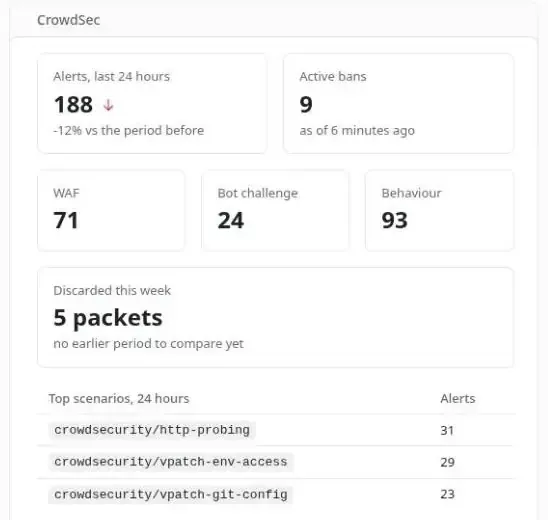
The CrowdSec card on the dashboard compares the last 24 hours of alerts with the 24 before, counts the bans in force now, splits alerts by kind (WAF, bot challenge and behaviour) and lists the top scenarios.
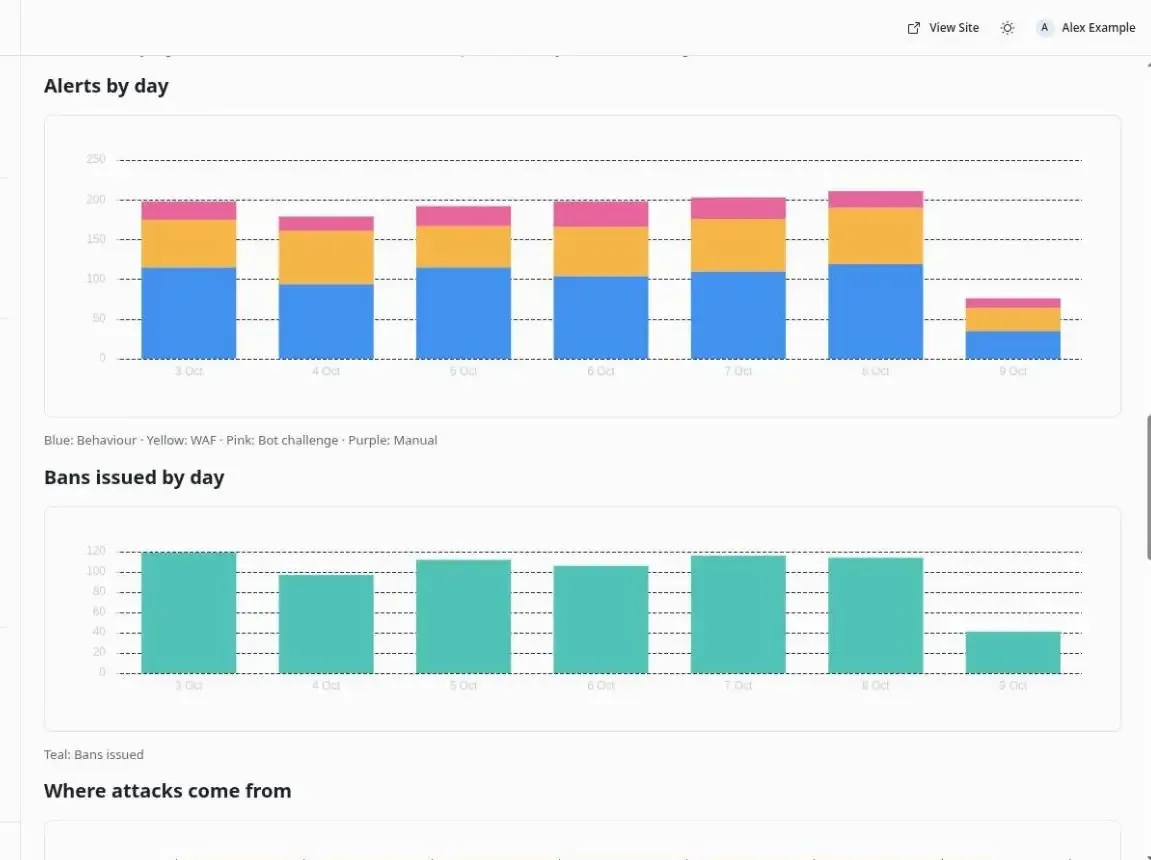
Three admin pages go further. CrowdSec covers the last 24 hours or 7, 30 or 90 days: alerts and bans by day, a chart of where attacks come from, and the top scenarios, source addresses, countries, AS organisations and targeted paths. CrowdSec alerts is the alerts explorer, below. CrowdSec decisions reads the decisions LAPI enforces right now, sorted by expiry.
The community blocklist reaches LAPI as tens of thousands of decisions that are not your site's events. The plugin leaves them out of every chart and table and shows them as one count on the decisions page.
Editors and administrators see all of it. Authors and contributors do not.
The alerts explorer
CrowdSec alerts is an explorer of the alerts the plugin has stored. A period bar runs from the last hour to everything kept, or since your last visit, and steps back and forward. Tabs split the alerts by kind: WAF, bot challenge, behaviour and manual.
Two breakdown panels start on source IP and behaviour (HTTP scan, HTTP exploit, bot, SSH brute force and so on, read from the scenario name). Either can switch to country, AS organisation, scenario, target path, kind or engine. Each shows its top three values with their share, and a histogram across the period. Any value can be added as a filter, and each active filter shows as a chip that removes it.
Below them, a table groups the alerts by address, newest first, with two hints: Banned now, when a decision on the address is still running, and Seen before, when it had alerts on days before the period. An address's view lists its alerts, and an alert's detail is read live from LAPI with its events and decisions. With Allow changes on, administrators can ban or unban the address and delete an old alert from there. The alerts_explorer MCP tool gives an AI agent the same view.
On a LAPI that collects alerts from several servers, each alert keeps the engine that raised it. The optional Engine names setting gives the engines friendly names, and the CrowdSec page adds a chart of alerts by engine.
Before you install
You need EmDash 1.0.1 or later with a sandbox runner, CrowdSec 1.7 or later, and EMDASH_ENCRYPTION_KEY set on the site so the machine password can be saved encrypted. npx emdash secrets generate makes a key if you don't have one.
On the CrowdSec host, create a LAPI machine just for the plugin:
sudo cscli machines add emdash-crowdsec --auto -f /root/emdash-crowdsec.yamlThe file holds the machine ID and password. Copy both into the plugin's settings, then delete it.
Publish LAPI for the plugin only
EmDash only lets a plugin call public HTTPS hostnames. It refuses private addresses, internal names and localhost, so a LAPI listening on 127.0.0.1:8080 has to be reached through a path on a public hostname, usually the site's own, such as https://www.example.com/crowdsec-lapi.
The hostname is public, but the endpoint is not open. The reverse proxy in front of it admits only the EmDash server's address and only the routes the plugin uses, and every request still needs the plugin's machine login. LAPI itself keeps listening on 127.0.0.1.
For a read-only install, admit three routes: POST /v1/watchers/login, GET /v1/alerts and GET /v1/alerts/{id}. To allow changes, also admit POST /v1/alerts, DELETE /v1/alerts/{id}, DELETE /v1/decisions/{id} and POST /v1/allowlists/check. Never admit DELETE /v1/decisions without an id. With no filter it removes every decision LAPI holds.
A short nginx example for a read-only install, with LAPI on 127.0.0.1:8080 and an EmDash server at 198.51.100.10:
# In the http block.
map "$request_method $uri" $crowdsec_lapi_route {
    default                                     0;
    "~^POST /crowdsec-lapi/v1/watchers/login$"  1;
    "~^GET /crowdsec-lapi/v1/alerts$"           1;
    "~^GET /crowdsec-lapi/v1/alerts/[0-9]+$"    1;
}

# In the server block of the public HTTPS hostname.
location /crowdsec-lapi/ {
    allow 198.51.100.10;   # the EmDash server
    deny  all;
    if ($crowdsec_lapi_route = 0) { return 403; }

    proxy_pass http://127.0.0.1:8080/;
    proxy_set_header Host $host;
}
If EmDash runs in Docker on the same server as nginx, its requests arrive from the container network, so admit that network instead. Exempt the path from any bot challenge or sign-in page, since the plugin cannot answer one. The README has the full route list and a guide to nginx and Traefik on a single host, including which address the proxy sees when EmDash runs in Docker.
The proxy must also leave the User-Agent alone. LAPI refuses a login whose User-Agent is not of the form name/version, with the same "incorrect Username or Password" a wrong password gets.
Install and set it up
In the EmDash admin, open the Registry, find CrowdSec and select Install. Its one permission is network access: to the LAPI URL you enter, to the optional metrics URLs, and to cloudflare-dns.com while changes are on. Then open Plugins and the plugin's settings:
- LAPI URL. The base without
/v1, such ashttps://www.example.com/crowdsec-lapi. Plain HTTP and private addresses are refused, and redirects are never followed. - Machine ID and Machine password. From
cscli machines add. The password is stored encrypted. - Sync every and Keep alerts for. 15 minutes and 90 days unless changed.
- Time zone. An IANA name. It starts at
Australia/Sydney, so set your own. - Allow changes. Off unless changed.
- Protected addresses. Addresses and ranges a ban must never cover.
Save, then open Plugins, CrowdSec and select Check setup. It tests the settings, a fresh login, read access and the scheduled sync, and says in one sentence what to fix for anything that fails. The first syncs read history newest first, so the charts fill backwards over the first couple of hours. On Cloudflare Workers the sync needs the Cron Trigger from EmDash's deployment guide.
Bans and unbans
With Allow changes on, an administrator can ban an address or range for an hour up to 30 days, remove a decision, and delete an old alert. Editors never see these controls, every change asks for confirmation, and the bouncers apply it on their next poll.
A ban is refused, naming the rule, when it would cover your own address, the site's or the LAPI host's addresses, a protected address, private or CGNAT space, a range wider than /16 (IPv4) or /48 (IPv6), or an address on a CrowdSec allowlist, which the plugin checks itself because LAPI skips that check for manual bans. Add your server and home addresses to Protected addresses before you turn changes on.
Deleting an alert also deletes its decisions where a bouncer that has not polled yet never hears of it, so the plugin deletes an alert only once its decisions ended more than two minutes ago. To lift a ban, remove the decision.
Traffic charts
The optional traffic charts show what CrowdSec did with what it noticed: packets the firewall bouncer discarded by source, and web requests the AppSec engine inspected and blocked. They read the Prometheus metrics of your own engine and bouncer, never CrowdSec's cloud, and stay off until you set a metrics URL. Publish those endpoints like LAPI: HTTPS, GET only, for the EmDash server only.
MCP tools
With Agent access on under Plugins, an AI agent can ask for a security summary, the top threats, the decisions in force, the alerts for one address, the traffic figures and the explorer's view of the alerts. Three more tools ban, unban and delete alerts, for administrators with Allow changes on. After an update from 0.1.0, EmDash asks for Agent access again because a tool was added, so turn it back on.
Get it
CrowdSec for EmDash is free, under the MIT licence. Install it from the EmDash plugin registry. The source, the full README and the issue tracker are on GitHub.


No comments yet